Overview
My role
Locomotion & UI
Engine
Unity (XR Toolkit)
Platform
Mixed Reality
Type
Industry project
Commissioned by Organisation Insights in collaboration with the Hogeschool van Amsterdam's Immersive Tech programme. The goal was to replace traditional slide decks with something users could physically step inside — a spatial representation of an organisation's folders, processes, and HR steps in mixed reality.
My work covered two interconnected areas: locomotion (making smooth movement feel comfortable in headset) and all UI — the spatial panels users interact with, and the gaze-triggered effects tied to every interactive element.
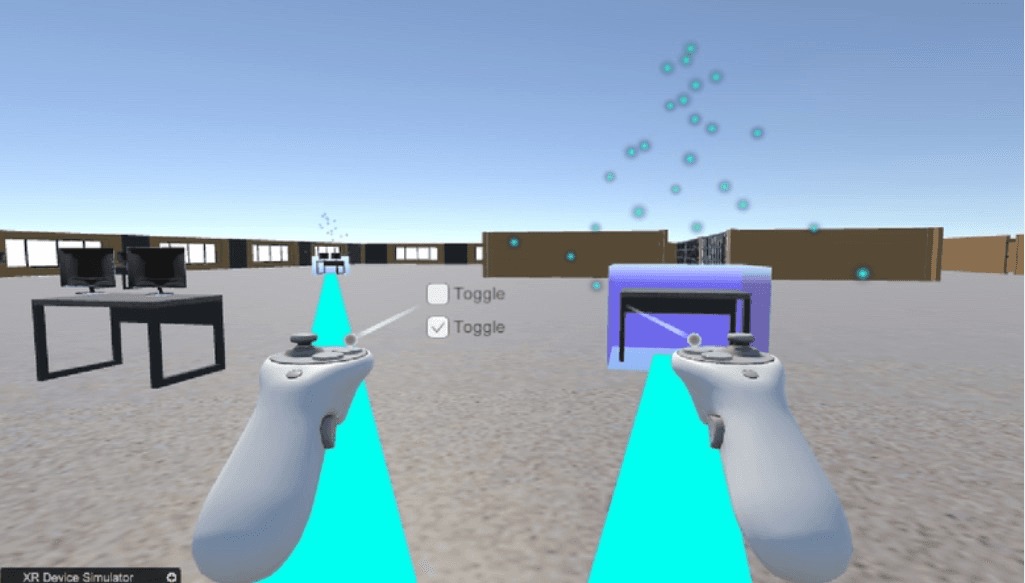
XR environment — raycast controllers and particle effects
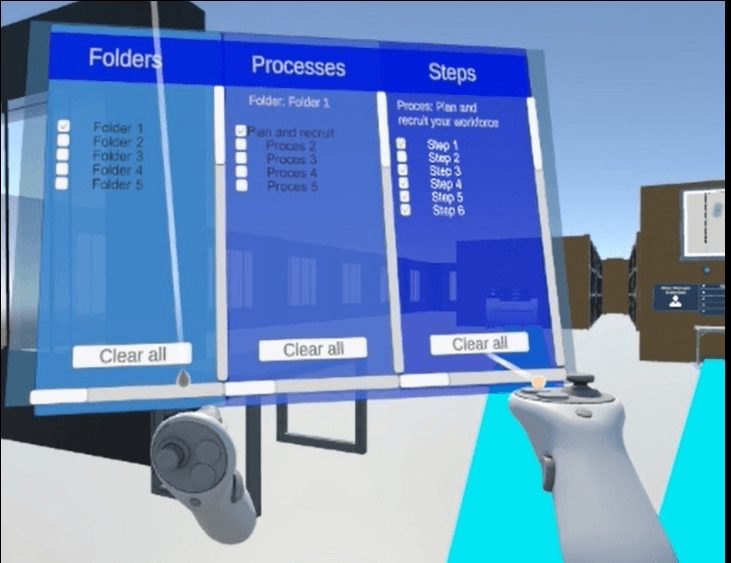
Spatial UI — Folders, Processes, and Steps panels in 3D space
Player Locomotion — Motion Comfort
Smooth continuous movement in XR can cause motion sickness because the visual system perceives motion that the inner ear doesn't feel. The movement direction reference is key: moving relative to the head (where you look) is generally more comfortable than moving relative to the controller (where you point).
Head-relative
usedForward is where the player looks. The most natural mode — body and visual flow align, reducing the sensory mismatch that causes discomfort.
Hand-relative
Forward is where the controller points. Can feel unintuitive when looking in a different direction than you're steering.
The DynamicMoveProviderblends both hands' movement poses weighted by each hand's input magnitude, so each hand can independently use a different reference. The per-hand direction is configurable in the Inspector without touching code.
public class DynamicMoveProvider : ContinuousMoveProvider
{
    // Each hand can independently use head-relative or
    // controller-relative movement direction.
    public enum MovementDirection { HeadRelative, HandRelative }

    [SerializeField] Transform m_HeadTransform;
    [SerializeField] MovementDirection m_LeftHandMovementDirection;
    [SerializeField] MovementDirection m_RightHandMovementDirection;

    protected override Vector3 ComputeDesiredMove(Vector2 input)
    {
        if (input == Vector2.zero)
            return base.ComputeDesiredMove(input);

        // Resolve the forward source per hand based on preference
        switch (m_LeftHandMovementDirection)
        {
            case MovementDirection.HeadRelative:
                m_LeftMovementPose = m_HeadTransform.GetWorldPose();
                break;
            case MovementDirection.HandRelative:
                m_LeftMovementPose = m_LeftControllerTransform
                                         .GetWorldPose();
                break;
        }

        // Blend the two poses weighted by each hand's input magnitude
        var leftHandValue  = leftHandMoveInput.ReadValue();
        var rightHandValue = rightHandMoveInput.ReadValue();
        var total = leftHandValue.sqrMagnitude
                  + rightHandValue.sqrMagnitude;
        var blend = total > Mathf.Epsilon
                  ? leftHandValue.sqrMagnitude / total
                  : 0.5f;

        m_CombinedTransform.SetPositionAndRotation(
            Vector3.Lerp(m_RightMovementPose.position,
                         m_LeftMovementPose.position, blend),
            Quaternion.Slerp(m_RightMovementPose.rotation,
                             m_LeftMovementPose.rotation, blend));

        return base.ComputeDesiredMove(input);
    }
}
Spatial UI
The main interface is a three-column spatial panel — Folders, Processes, Steps — that users can interact with using controller raycasts. All UI panels exist in 3D space rather than being screen-overlays, so users physically navigate between content areas.
public class StepManager : MonoBehaviour
{
    [Serializable]
    class Step
    {
        public GameObject stepObject;
        public string     buttonText;
    }

    [SerializeField] TextMeshProUGUI m_StepButtonTextField;
    [SerializeField] List<Step>      m_StepList;
    int m_CurrentStepIndex = 0;

    public void Next()
    {
        // Hide current step panel, advance index, show next
        m_StepList[m_CurrentStepIndex].stepObject.SetActive(false);
        m_CurrentStepIndex = (m_CurrentStepIndex + 1) % m_StepList.Count;
        m_StepList[m_CurrentStepIndex].stepObject.SetActive(true);
        m_StepButtonTextField.text =
            m_StepList[m_CurrentStepIndex].buttonText;
    }
}
The StepManagerdrives the HR process step panels — each "Next" call hides the current step object and activates the next, keeping the content progression tied directly to what's visible in 3D space.
Gaze-Triggered Effects
Every interactive UI element has feedback effects that activate when the user gazes at it. A CalloutGazeController measures whether the gaze direction is facing the element (dot product against a threshold), then fires events that the Callout listens to — revealing tooltips after a dwell period.
public class CalloutGazeController : MonoBehaviour
{
    [SerializeField] Transform m_GazeTransform;

    // Dot product threshold: 1 = exact forward, 0 = 90 degrees.
    // 0.85 means the controller must be roughly within 30° of
    // the user's gaze to trigger.
    [Range(0f, 1f)]
    [SerializeField] float m_FacingThreshold = 0.85f;

    [SerializeField] UnityEvent m_FacingEntered;
    [SerializeField] UnityEvent m_FacingExited;

    void Update()
    {
        CheckLargeMovement(); // suppress during fast head turns

        float dot = Vector3.Dot(
            m_GazeTransform.forward,
            (transform.position - m_GazeTransform.position).normalized
        );

        if (dot > m_FacingThreshold && !m_IsFacing)
            FacingEntered();   // fires → shows callout
        else if (dot < m_FacingThreshold && m_IsFacing)
            FacingExited();    // fires → hides callout
    }
}public class Callout : MonoBehaviour
{
[SerializeField] Transform m_LazyTooltip;
[SerializeField] GameObject m_Curve;
[SerializeField] float m_DwellTime = 1f; // seconds to hold gaze
public void GazeHoverStart()
{
m_Gazing = true;
m_StartCo = StartCoroutine(StartDelay());
}
public void GazeHoverEnd()
{
m_Gazing = false;
StartCoroutine(EndDelay());
}
IEnumerator StartDelay()
{
yield return new WaitForSeconds(m_DwellTime);
if (m_Gazing)
{
m_LazyTooltip.gameObject.SetActive(true);
m_Curve.SetActive(true);
}
}
}Gaze detection
Dot product of the gaze forward and the vector to the UI element. Threshold 0.85 means the element must be within ~30° of the user's direct line of sight.
Dwell time
Tooltip only appears after the user holds their gaze for 1 second — prevents accidental triggers while scanning the environment.
Large movement suppression
Fast head rotation during locomotion temporarily disables gaze events (0.25s cooldown) so tooltips don't flicker when moving through the space.
Team
HvA students
Industry partner
Organisation Insights